Ignite Your Typography with Dynamic Fire Text Effects
In the competitive landscape of digital content, static text often fails to capture the fleeting attention of an audience. To create a truly memorable visual hierarchy, designers need tools that inject energy and emotion into their typography. This is where the Fire Text Effects toolkit emerges as an indispensable asset, offering a premium collection of Photoshop templates designed to transform standard lettering into a blazing, cinematic inferno.
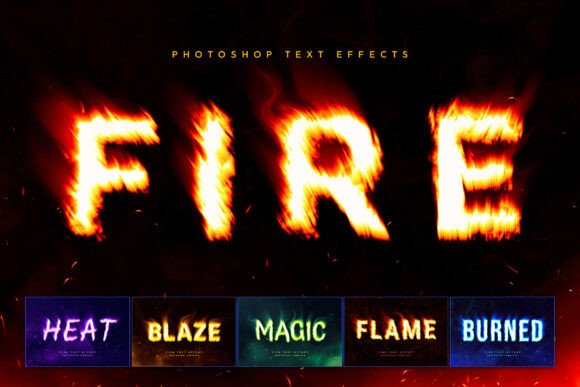
At its core, this generator utilizes advanced Smart Object workflows to simulate realistic combustion. It goes beyond simple overlays; the system generates volumetric lighting, heat distortion waves, and atmospheric dark smoke to create depth and realism. Whether you are working on a logo design or a social media header, the ability to instantly wrap your text in roaring flames and organic flying embers adds a professional polish that manual painting cannot easily replicate.
Practical Applications for Modern Creators
The versatility of these fire text effects extends across numerous creative projects. For graphic designers focused on branding and visual communication, an intense typographic treatment can immediately establish a tone of power, aggression, or mysticism. This is particularly effective in specific industries where a bold visual identity is required to stand out.
Consider the following areas where this style of visual design excels:
- Gaming and Esports: Create aggressive team logos, streaming overlays, and video headers that resonate with the high-energy gaming community.
- Music Industry: Design high-impact album covers for rock, metal, or electronic genres, where the cover art often dictates the perceived sound of the music.
- Event Promotion: Build striking titles for action movie trailers, Halloween flyers, or nightclub events where the aesthetic demands a dark, fiery vibe.
- Streetwear and Merchandise: Develop bold graphic placements for apparel, such as hoodies and t-shirts, aligning with modern urban design trends.
Streamlining the Design Workflow
Efficiency is a cornerstone of professional design. The Fire Text Effects toolkit is built to support a rapid design workflow without sacrificing quality. By leveraging the Smart Object functionality in Photoshop, the process of applying these effects is reduced to a few clicks. You simply double-click the designated layer, input your custom typography or vector monogram, and save. The automation handles the complex rendering of embers and lighting, allowing you to focus on broader creative decisions.
Furthermore, the inclusion of six distinct chemical style variations—from classic orange combustion to mystical green and ethereal blue glows—provides flexibility. This allows you to adapt the color palette to match specific brand guidelines or the mood of a particular campaign. When selecting a style, always consider the context of the final output to ensure the text remains legible and the visual message is clear.
Enhancing Visual Communication
While flashy effects are engaging, they must serve the purpose of the design. When integrating fire text effects into your digital marketing materials or web design elements, prioritize readability. Use these effects for display text, headlines, or logos rather than long-form body copy. The goal is to guide the viewer's eye and create a focal point within your composition.
Ultimately, high-quality creative assets